Let’s talk about one of the easiest ways to level up your AI images without writing a prompt that looks like it lost a fight with a thesaurus.
Over the past few years, I’ve learned a lot about what actually works when generating AI images, especially here at Pirate Diffusion. And let me tell you, the landscape has changed fast. The tools are better, the models are smarter, and getting strong results is way easier than it used to be.
Back when I made my first AI images, prompting often felt like trying to negotiate with a raccoon in a wizard hat. You could get something great, but it took patience, luck, and possibly a blood sacrifice.
Now? Things are smoother. Smarter. Friendlier.
But even with all these improvements, there’s still a huge advantage in having a handful of reliable keywords and modifiers you can reach for whenever you want to nudge an image in the right direction.
That’s really what this post is about.
These are the prompt modifiers I keep coming back to over and over again. The ones that help take an image from “yeah, that’s okay” to “okay wow, now we’re cooking.”
Some of them add realism. Some change the lighting. Some mess with the lens or composition in a really fun way. Some just give the whole image a stronger mood, texture, or visual identity.
They’re simple, powerful, and ridiculously useful.
So today I’m sharing 30 prompt modifiers you can plug into your own prompts right away.
A few of my personal favorites for a more photographic look are things like cinematic lighting, studio lighting, depth of field, and ultra realistic. These tend to add polish fast.
I also love using camera and lens modifiers when I want the image to feel more stylized or visually specific. Things like polaroid photo, fisheye lens, or shot on 35mm film can completely shift the flavor of the final image with just a couple of words.
Tiny phrase. Big visual consequences.
That’s the game.
So here’s the list. Steal these shamelessly, mix them into your prompts, and see which ones become part of your own secret sauce.
🎯 30 Powerful AI Image Prompt Modifiers
📸 Realism & Photography Boosters
These are fantastic when you want your image to feel more grounded, photographic, and believable.
cinematic lighting
soft natural light
golden hour
studio lighting
volumetric lighting
rim lighting
depth of field
shallow depth of field
bokeh
ultra realistic
Example:
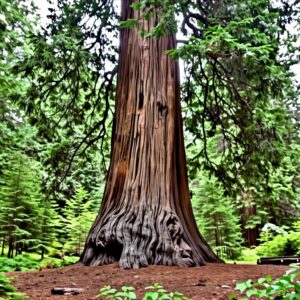
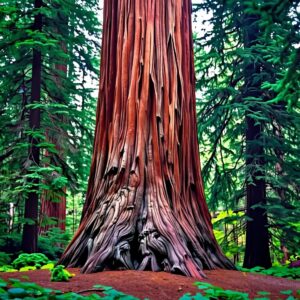
A simple prompt: “an old gnarled redwood tree”. The second image simply adds “cinematic lighting”. Notice how the image is richer and more believable.
🎥 Camera & Lens Effects
These can quietly change the entire composition and make the image feel like it was captured through a specific lens or medium.
shot on 35mm film
polaroid photo
macro photography
wide-angle lens
telephoto lens
fisheye lens
motion blur
long exposure
Example:
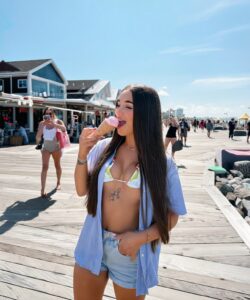
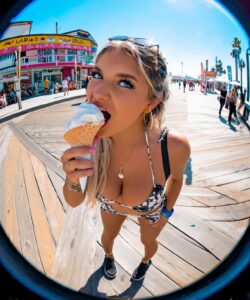
The prompt: “a pretty social media influencer eating an ice cream cone on a busy boardwalk”. The second image simply adds “fisheye lens”. Much more eye-catching!
🎨 Texture & Detail Enhancers
These are great for adding richness, clarity, and that tactile “you can almost feel it” quality.
highly detailed
hyper-detailed
intricate textures
sharp focus
film grain
noise texture
Example:
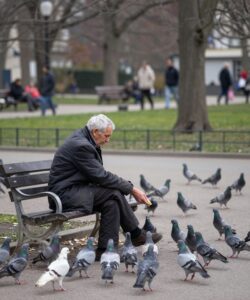
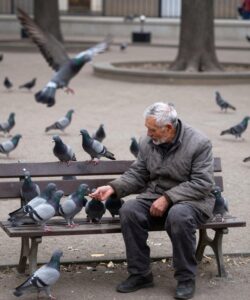
The prompt: “a lonely old man sits on a park bench feeding pigeons” The second image simply adds “hyper detailed”. Notice how, suddenly, the image appears so much richer and authentic.
🌈 Color & Style Modifiers
These are mood shifters. Use them when you want to steer the emotional tone or visual palette of the image.
muted tones
pastel color palette
vibrant colors
monochrome
black and white
color graded
cross-processing
Example:
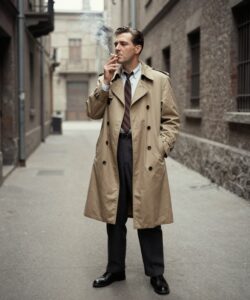
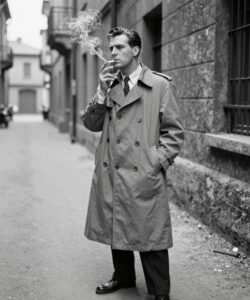
The prompt: “a man in a trench coat stands in a deserted alleyway smoking a cigarette, 1950s retro”. The second image simply adds “black and white” and you get an instant retro classic!
🧠 Artistic & Conceptual Styles
These are for when you want to get weird, dreamy, dramatic, or just a little more scroll-stopping.
surreal
dreamlike
ethereal
otherworldly
dystopian
retro aesthetic
vaporwave
analog aesthetic
Example:
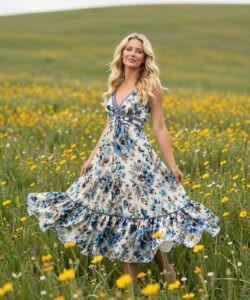
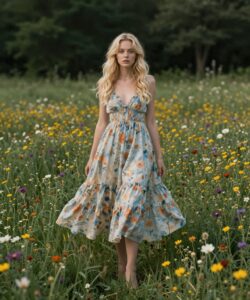
The prompt: “a beautiful blonde woman in a flowing summer dress stands in a field of wildflowers”. The second image simply adds the term “dystopian”. Notice the more somber color palette and her facial expression that seems to hint that things aren’t quite ok.
The beautiful thing about modifiers like these is that they don’t require some giant galaxy-brain prompt to be effective. A few well-chosen phrases can do a ton of heavy lifting.
That’s the part a lot of people miss.
Prompting is not always about adding more. Very often, it’s about adding the right things.
A single modifier can change the lighting, lens feel, mood, texture, and overall personality of an image faster than ten extra adjectives ever will.
So play with these. Stack a few together. Try weird combinations. Break stuff on purpose. That’s half the fun.
And most importantly, keep the ones that make your images feel more like your images.
That’s where the magic starts.
Thanks for reading, and I hope this gives you a few new weapons for your prompt toolbox.
Now go make something gorgeous.